

D
Deleted member 44219
Hello there. So over the past few days, I've been posting progress updates for this Webportal that I'm working on called, 'Search-Compass'.
And in just a couple of days, I've done a good amount of progress.
So to start, I've now added more stuff into the Homepage. Here's a picture showing some of the content that's going to be featured in the Homepage:
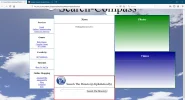
Looking at that image, you can see some of the stuff I've added and changed about. Here's a highlight of what's been added/changed:
Now, I'm going to tell you about this one part of the site that's probably intriguing you just now. The Alphabetical-Webpage-Search-Directory(AWDR for short). Here's a close up picture of it here:
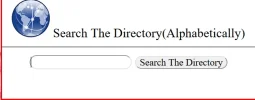
So this is a Search-Engine, Custom-Made just for Search-Compass. What it does is:
And my final thing to say for this Progress-Update is a Logo for Search-Compass. It's a simple looking Logo but it will do for now. Here it is:

Tell me if you like the amount of progress being made so far. I'll be sure to keep you updated.
And in just a couple of days, I've done a good amount of progress.
So to start, I've now added more stuff into the Homepage. Here's a picture showing some of the content that's going to be featured in the Homepage:
Looking at that image, you can see some of the stuff I've added and changed about. Here's a highlight of what's been added/changed:
- More Website Links in the ESD(Extra-Stuff-Dock)
- Changed the Font from Arial to Times New Roman
- A Featured-News Section
- Photo and Video Highlights Section
- A Custom-Made Search-Engine just for this site
- Changed the Background from one on the internet to a generated picture
Now, I'm going to tell you about this one part of the site that's probably intriguing you just now. The Alphabetical-Webpage-Search-Directory(AWDR for short). Here's a close up picture of it here:
So this is a Search-Engine, Custom-Made just for Search-Compass. What it does is:
- The User enters in a Letter from the Alphabet(A, H, G, X etc.)
- Clicks the 'Search The Directory Button' or the Right-Shift Key
- An entire of page of selected Webpages will be displayed
And my final thing to say for this Progress-Update is a Logo for Search-Compass. It's a simple looking Logo but it will do for now. Here it is:
Tell me if you like the amount of progress being made so far. I'll be sure to keep you updated.


