D
Deleted member 44219
Hey there. So, I've of course, been posting these devlogs for a new Webportal that I'm working on called: 'Search-Compass'.
On one of these devlogs, I got told about the Design of Site and how it looked like it was in the 90's. In which I agreed and as of today, restarted the whole project to focus on it's Design. For the first part of the Design, was the two Navigation-Menus. The General-Stuff-Dock(GSD) and The Extra-Stuff-Dock(ESD). These are Navigation-Menus that can take you to other parts of the site or somewhere else on the WorldWideWeb.
So let's take a look with what I've began working on for this UI Re-design of the project:
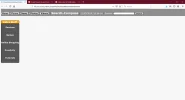
There are some notable changes and differences you can see in this picture. Let me highlight them:
On one of these devlogs, I got told about the Design of Site and how it looked like it was in the 90's. In which I agreed and as of today, restarted the whole project to focus on it's Design. For the first part of the Design, was the two Navigation-Menus. The General-Stuff-Dock(GSD) and The Extra-Stuff-Dock(ESD). These are Navigation-Menus that can take you to other parts of the site or somewhere else on the WorldWideWeb.
So let's take a look with what I've began working on for this UI Re-design of the project:
There are some notable changes and differences you can see in this picture. Let me highlight them:
- The Background Image was removed in favour of a plain, Background
- The General-Stuff-Dock is attached to the very top instead of floating
- The Extra-Stuff-Dock is also attached to the left instead of floating
- The Font has been changed from Times New Roman to Verdana
- Objects like Buttons are rounded instead of square
- The Search-Bar is at the top instead of the bottom