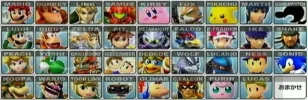
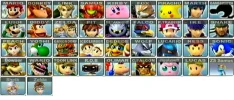
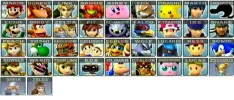
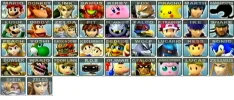
Is is possible to get the name tags, to appear just like they are in the original pic? If not, then my life is over ~cry~
Ok. The Payment Plan. This graphic is worth, 500 FP Cash , +2 Rep AND ... if you have a forum, and complete this, I will be active for one week, and make from 3-5 posts a day on your forum.
NO! LOL!!! I can do the cropping. what i need done, is listed below the pic. The name changes on the three i listed. and then i need 3 of these buttons, with the new characters, and images i supplied. Done just like they are up above.
but, you may need to crop the 3 images for the name changes, i guess?
Dude! Ask ANYONE here. I always pay up, even if i don't like your image! I always Rep for putting in effort. But, i don't give rep when someone bribes me. 😉
I ALWAYS come through on my end of the deal. But, you may want to hurry, though, I'm sure my week of sctivty on someon'e forum, is going to be the "hook" that gets members wanting to complete this.
No need for double posting, just edit your original post.
Ok. Honestly, i LOVE what you did with the names. And i forgot to mention they need to be in all CAPS. sorry.
And, the 3 images you made, are on the RIGHT track. I didn't mean i just need their faces only, though. -D-
i just need a square crop around their faces, kinda how they are done in the pic with all the mains.
I shoulda found bigger pics. Here's some better ones to work with. I could crop them myself, and just let you add the names to them, maybe. But if you want to try, just use these images, and crop a square around their faces, so they fir in the box.
OK, I'm using Paint.NET, but I'm gonna do it in Photoshop later (the reason I was using Paint.NET is because I'm newer to PS.) since PS would be more powerful to fix this up.
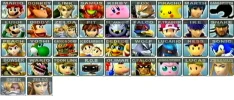
Here's the final Paint.NET version, I will attempt to get the PS version done by tonight.
Dude!! That really looks great so far, But i think i'm leaving too much space when i cropped those 3 images. I want the size fo their faces to match the sizes of the other characters faces. And the background color behind the faces, as well, try to make it match as best as you can.
I'll go recrop another set for you.
Really bro! I'm impressed with what you're doing so far 🙂
If it's possible, could you get the name text to be transparent, the text and font is PERFECT SO FAR! I just need all of them to match up, cause they'll be side by side in member's mini-profiles.
And, I'll still pay thedudeman full price for what he's got so far, and hook you up as well Murder 🙂
This is just something really important for my forum; and you saw the demo of what i'm doing Muder, already.
Photoshop version attached. Looks a ton better than my earlier version. hcf, is this OK so far? All I need to do so far is figure out how to make that text more transparent.
DUUUUUUUUUUUUUUUUDE!!!!! That's it. That is IT!!!!!! -D-
Looks so amazing, now. And, yes, all that is left, is for the transparency! And maybe getting the 3 new buttons, backgrounds to match in color, if possible?
I knew doing it in Photoshop would do the trick. -🙂-
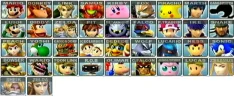
Here's this transparent, I have the psd file saved so I can easily adjust it to be more/less transparent. (Though I can't make it much less transparent or else the text will start to fade a bit too much.)
I'll take it. 🙂 But was there "anyway" at getting the 3 new buttons, the backgrounds to match in color with the other buttons, the color behind the faces, if possible?