
Cleaning Up Macbook Pro Tips?

Sharon

Seasoned Veteran
Joined
Nov 14, 2013
Messages
4,893
Reaction score
992
FP$
20,830
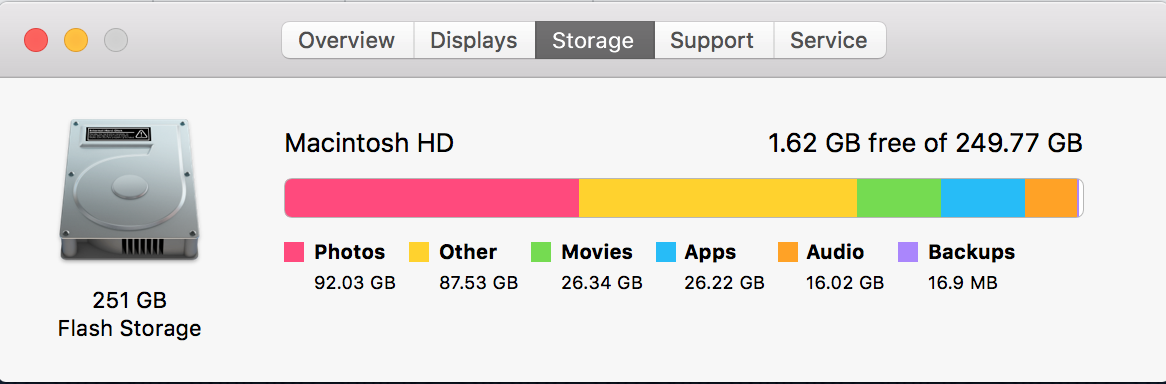
I am very limited on time this morning so I thought I'd just post this here in case some of you Mac users may have some tips for me. Lately I've been struggling to use my computer because I am getting the error message saying something like I have limited storage space. I tried to do a quick search on Google but most of the responses I'm reading are like "Don't download any apps because it will cause more issues when can do this yourself." ...so yeah, I don't exactly know what I'm doing. I know I should move my photos to an external drive which I will do SOON. ...but is there anything I can do immediately to free up some space? I've already gone through my downloads folder and there is only 67MB worth of files in there now so I'm not worried about that.
q0UOcie.png
 
I'd personally put all my photos on a backup drive or disk; especially if I had that many. I'm not a Mac guy, so I don't know any "secrets" so to say, but I always put my music, pictures, and movies/videos on a hard drive or on a storage disk.
 
John thank you for your thoughts. 😉 I have already made a note to make that one of my goals this weekend - transfer all of my media files into an external hard drive. There really is no reason why I shouldn't do that. I've just been procrastinating on the process!
 
Use DaisyDisk to get a good idea on what files in particular take up the most space in your computer. You can use the app during the trial period and hopefully it can help you get regain significant amount of free space back. It's always a good idea to ensure that your hard disk space has at least 10% remaining at all times lest your computer will slow to an absolute crawl, ergo opening a can of worms.

I'd recommend you a maintenance utility app that can look for things that are often the culprit behind a palpitating hard disk like caches, mail attachments, large & old files, and sometimes leftover files from apps you deleted — this is assuming you don't use anything like AppCleaner.

However, such apps can potentially render your computer useless if you're not familiar with them. CleanMyMac is one of them; useful when handled correctly but at the same time it can be your worst nightmare following a wrong decision. There's a lot more of them, including free alternatives that's just as good, but they're not as friendly to the user thereby heightening the risks.

For now, give DaisyDisk a shot and see if you find anything that's perfectly fine to delete.
 
I've used a program called DiskDoctor I think before, but I recommend putting photos and similar stuff on an external hard drive or another machine.

There's a lot taken up by "Other" though 😱 Any particularly large files other than the photos?
 
I'm happy to report that my computer is fully functioning again! 🙂 DaisyDisk is AWESOME almost paid for the full version just because it helped me out so much...but I didn't. lol
 
Find an window and throw it out :lol:
 
Sharon said:
I'm happy to report that my computer is fully functioning again! 🙂 DaisyDisk is AWESOME almost paid for the full version just because it helped me out so much...but I didn't. lol
I'm happy to hear that! A jittery computer can be very frustrating.

I'd share you a generous coupon code from last year but I lost it. It's a coupon code that provides a huge discount—possibly one or two quid instead of the original ten quid—through the website. I don't think you'll need the app very often though so you should be fine even without a license.

In case you find yourself in the same predicament again and your trial run is over you can check out this free alternative GrandPerspective. It's not as pretty and may even be confusing, but it still might be of use to you.
 
My tip to you, Sharon, my love, is to quit Hoarding PHOTOS and crap. LOL 😀
 
Woah, you have a lot of pictures! xD

Have you put any of them on Dropbox or anything like that? That should free up some space so you can delete them. I don't know if Dropbox is for Mac, though.
 
Use following useful tips to clean your Mac book:

-First replace your hard drive with SSD.
-Add more memory to your hard disk.
-Clean up of your mac book hard drive is also an important way to boost up its speed.
-Do not open too much applications one time,too much login applications make your mac slow.
 
Easy and simple tips to give your trusted Mac a little cleaning of its own.

1. Clean up your hard drive. It is the easiest way to make your MAc faster. Go through your hard drive and clean out everything that’s slowing it down. Clean Caches, logs, apps, widgets, language packs, plugins, hidden trashes, and large files. But there is something which is not remove, So there’s an easy solution to it, Cleanmymac app has everything you need to finish the 3-hour task of hard drive cleanup in under 5 minutes.
2. Uninstall Unnecessary Apps. We'd suggest using an actual uninstaller, like our current favorite, AppCleaner, which is completely free. If you use one of these apps to remove those unwanted programs from your system, you can be sure you're getting rid of all of their associated files as well.
3.
Do Some Maintenance and Optimize Your System. Now we have cleaned out the unwanted files from our Mac, it's time to optimize your OS. Head into Disk Utility and click "Verify Disk." It shouldn't take too long, and if you see any errors, wait for it to finish and click "Repair Disk."
 
Woah, you have a lot of pictures! :laughing:

Have you put any of them on Dropbox or anything like that? That should free up some space so you can delete them. I don't know if Dropbox is for Mac, though.

It is 🙂. Over the past several years (least since I started using Mac, five-six years ago), there are fewer apps that are 'Windows only'. To be fair, though, I don't really download apps and programs all that frequently.

OP, I realize you have rectified your predicament―and am glad to hear that, too―I'd still heavily recommend you keep your files (i.e., Microsoft Docs, pictures, notepad files, etc.) on a separate hard drive. I think you said you planned on doing that, anyhow, but unsure if you have actually bought one. I personally use a pre-Mac partitioned Western Digital, purchased on Amazon. Link "here" to the one I bought if interested in taking a gander.

DaisyDisk is certainly a phenomenal choice. Am glad you steered clear of the more confusing, often less successful ones like CleanMyMac. I am one of the unfortunate souls who ventured into using that when I started using Mac, and as the person who suggested it said… I came across a multitude of issues; I've since wised up
 
Back
Top Bottom