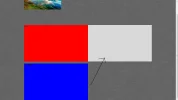
For a website im making, My first ecer hand coded one, How can i position the containers?.
Ive made the Left container red, and the right container blue, so that you can see where the containers are.
The left one is in the position i want, and i want the Right container next to it.
HTML
CSS
Thanks. 🙂
Ive made the Left container red, and the right container blue, so that you can see where the containers are.
The left one is in the position i want, and i want the Right container next to it.
HTML
Code:
<!DOCTYPE html>
<html>
<head>
<link rel="stylesheet" href="style.css">
<title>site</title>
</head>

<div id="header">
</div>

<body>
<div id="main">
<div id="leftcontainer">
<p>Test</p>
</div>
<div id="rightcontainer">
<p>Test Right</p>
</div>
</div>
</body>
CSS
Code:
/*
p {color:blue;}
*/

body {
  background-image: url("images/background.png");
  background-repeat: repeat;
}

#main {
width: 980px;
height: 280px;
margin: 0 auto;
padding: 0px;
background-image: url("images/main.png");
background-repeat: repeat;
}

#header {
width: 980px;
height: 280px;
margin: 0 auto;
padding: 0px;
background-image: url("images/header.jpg");
background-repeat: no-repeat;
}

#leftcontainer {
width: 490px;
height: 280px;
margin: 0px;
padding: 0px;
background: #ff0000;
}

#rightcontainer {
width: 490px;
height: 280px;
margin: 0px;
padding: 0px;
background: #0000FF;
}
Thanks. 🙂