
Decimal point

Ashley S

Paragon
Joined
Jun 7, 2010
Messages
2,074
Reaction score
34
FP$
501
Code:
<td class="forum_stats" width="33%" align="center" style="white-space: nowrap"><span class="smalltext"><b>Total Topics:</b> {$stats['numthreads']}</span></td>
<td class="forum_stats" width="33%" align="center" style="white-space: nowrap"><span class="smalltext"><b>Total Posts:</b> {$stats['numposts']}</span></td><table border="0" cellspacing="1" cellpadding="4" class="tborder">

How can I put a coma in 1000 posts? So it looks like this 1,000

JayQR.webp

That's what it looks like at the moment, but in my ACP settings on MyBB it says it should be displaying the , in the 1000.
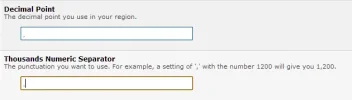
kbOj7.webp

Is there any way of fixing this?

Forum - http://chatarena.org/index.php
Thank you
 
What version of MyBB are you using and is this setting saved in the database?
 
Try changing the decimal setting from a comma to a full stop. I'm not having this problem when I try on my test board.

If that doesn't work I'd assume a plugin is interfering with it. You can test this by going to General Configuration > Disable all plugins > Click yes.

This won't deactivate them or uninstall, but just stops them from working for purposes such as this.
 
Open index.php file.

Find:
Code:
eval("\$forumstats = \"".$templates->get("index_stats")."\";");

After that add:
Code:
eval("\$num_topics = \"".my_number_format($stats['numthreads'])."\";");

Then in your index template, use {$num_topics} variable to get total topics with decimal seperator.
 
I thought it was that kavin, I assumed they had this already added in 1.6.9, which is why I asked the version the forum was using.

I got it wrong, oops!
 
kavin said:
Open index.php file.

Find:
Code:
eval("\$forumstats = \"".$templates->get("index_stats")."\";");

After that add:
Code:
eval("\$num_topics = \"".my_number_format($stats['numthreads'])."\";");

Then in your index template, use {$num_topics} variable to get total topics with decimal seperator.

Still not working.
 
J Greig said:
I thought it was that kavin, I assumed they had this already added in 1.6.9, which is why I asked the version the forum was using.

I got it wrong, oops!
Nope, they haven't added it yet. But i guess they should add it, as lot of designers now tend to use $stats variables.

Ashley S said:
kavin said:
Open index.php file.

Find:
Code:
eval("\$forumstats = \"".$templates->get("index_stats")."\";");

After that add:
Code:
eval("\$num_topics = \"".my_number_format($stats['numthreads'])."\";");

Then in your index template, use {$num_topics} variable to get total topics with decimal seperator.

Still not working.

Are you sure you followed the exact steps? I tried it on a 1.6.9 board and it worked fine.
 
Strange, should it look like this? If so then it's still not displaying the coma.

Code:
<td class="forum_stats" width="33%" align="center" style="white-space: nowrap"><span class="smalltext"><b>Total Topics:</b> {$num_topics}</span></td>
<td class="forum_stats" width="33%" align="center" style="white-space: nowrap"><span class="smalltext"><b>Total Posts:</b> {$num_posts}</span></td>
 
Ashley S said:
Strange, should it look like this? If so then it's still not displaying the coma.

Code:
<td class="forum_stats" width="33%" align="center" style="white-space: nowrap"><span class="smalltext"><b>Total Topics:</b> {$num_topics}</span></td>
<td class="forum_stats" width="33%" align="center" style="white-space: nowrap"><span class="smalltext"><b>Total Posts:</b> {$num_posts}</span></td>

Hmm. For the num_posts to work you should add this line too to index.php
Code:
eval("\$num_posts = \"".my_number_format($stats['numposts'])."\";");
 
Ashley S said:
kavin said:
eval("\$num_posts = \"".my_number_format($stats['numposts'])."\";");

That's what I did, still doesn't display the , 🙁

Hmm. Not sure why it happens. As i tried both in a MyBB 1.6.9 board and it worked fine.

If it still doesn't work, you can try the javascript approach of toLocaleString().
But i won't recommend it, as it won't display same for everyone.
 
Back
Top Bottom