

NoLifeNerds
Reputable
I've noticed many new members that promote their forums here use a free forum building site. Now, don't get me wrong, there is nothing bad with that because sometimes you just don't have the time or money for those big fancy forum hosting/building services. Which is why I am going to babysit you and help you step-by-step on how to make a good forum without using a free service such as createaforum, forummotion, etc...
First off, for the sake of this post, we're going to be using MyBB. MyBB is free forum software that allows the user to customize their forum how they want it. It's, in my opinion, more easier to install and use than phpBB.
The images might be too big, so just right click them and select "View image"
Step 1
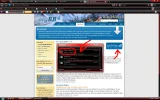
First, as always, download the MyBB software from their site, check the Links section for more information. You'll need an decompressing program like 7-Zip, WinRAR, etc...
Step 2
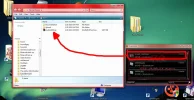
Create a folder, name it what ever you want. I'll name my folder, "Tutorial Forum". When you do this, drag and drop your mybb.zip file into that folder. Remember to download a decompressing program, you need it now. Right click your mybb.zip file and select "Extract here". This will decompress all those zipped files into your folder that the .zip file is. When you finish, your folder should look like what the images looks like.
Step 3
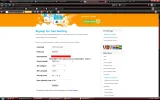
Now that you have extracted those files, time to get a bit technical. Now, you're going to need a hosting service. I recommend using Byethost since I have used them for quite a while and their services are exceptional. When you get to the Byethost homepage, go ahead and click the "Free Hosting" tab up in the navigation bar, this will allow you to sign up for their free hosting. Optionally you can sign up for their paid hosting as well, but for the sake of this post, we'll stick to free hosting. Go ahead and enter a username, password(8 character max), E-Mail, what script you're installing(in this case it's MyBB), Site Category(select forum), Language(English, unless other) then finally enter the security code.
Step 4
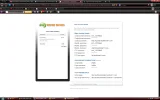
Byethost will send you an account activation link to your email, so go ahead and log into your email account. The email will usually say "Byethost#" whereas '#' is a random number, this is your byethost number to clear any confusion if you make multiple accounts. Open up the email and click the activation link, it will take you to an activation page that requires the user to wait a minute before getting their hosting information. Once the page is done, you'll be redirected to a private page that contains your MySQL information, cPanel credentials, byethost username, etc...
Step 5
Go ahead and highlight the Control panel URL, right click and select "Open Link in New Tab". You be redirected to the vistapanel log in page. Go ahead and copy your byethost username in the username box, then enter the password you choose during registration into the password box. Now, at the bottom you'll see something that says cPanel X3, you can change it from that to vPanel, both are the same. We'll use the cPanel X3 for this one. Once you log into your cPanel, you'll be at the heart and sole of your forum. First off, you need a subdomain, so go click the "Sub Domain" icon under the "Domains" category. Once there, go ahead and make a new domain, don't bother with the drop down menu for the extensions, just enter a name and click "Create."
Step 6
Now, you need to download 1 last thing, Filezilla. Filezilla is a FTP, this allows you to transfers your files onto your hosting service, meaning you can now transfer MyBB files to your host. Go to the Filezilla site and download the CLIENT, not the SERVER. Once the download finishes, you should be prompted to install it, I haven't had to install Filezilla again for so long so forgive that I do not remember. Once the installation finishes, you'll need to connect to the hosting server, so this is why I told you to open the cpanel url in a new tab. Go back to your Activation Page and get your FTP username, FTP hostname and password. Enter that information into your Filezilla, up in the left hand corner, then click connection.
Step 7
You should see 2 files, one says "htdocs" and the other says your sites name(Remember from making the subdomain?). Double click the folder with your sites name, then double click htdocs, here is where you'll transfer your files into your forum. Open your forums folder again and double click the "Uploads" folder. Select all the content in there and drag it into the Filezilla client to being the transferring process. This will take anywhere between 5-10 minutes, you might also be prompted with messages, just select "apply to uploads" or something like that.
Step 8
Once the files are done transferring, this is where you'll REALLY need to read carefully. Go back to your forums folder and open the "Documentation" folder. This folder contains some helpful webpages and other things, but right now you only need to open is the "install.html". Now, this part is going to take quite a while to write and explain. You should be able to read what those file names are, but if you have trouble with figuring out how to CHMOD them, just go to the file/folder you need to fix, right lick and select "File permissions" and change the numbers to the number that is needed.
Step 9
Now, you're ready to finally end this and install your forum! When you're done with the CHMODDING and all that, open up your forum using this link: http://www.yoursitename.byethost#.com/install. This will take you to the installation page. Now, due to other matters, I am unable to help you with the installation page. I will, how ever, give you a basic understand on what you are supposed to do. Basically, you're going to use either your Account Activation page or your Account Details section on your cPanel homepage.
I hope this helps you newcomers who are interesting in making a forum, but have no idea how or where to start. If there is another topic like this though, please feel free to inform me and have an Admin lock this topic. If this is the wrong place to post this, will an Admin please inform me and move it to the correct area. Feel free to correct me on anything so that I can update this post. Thank you for reading.
Links
First off, for the sake of this post, we're going to be using MyBB. MyBB is free forum software that allows the user to customize their forum how they want it. It's, in my opinion, more easier to install and use than phpBB.
The images might be too big, so just right click them and select "View image"
Step 1
First, as always, download the MyBB software from their site, check the Links section for more information. You'll need an decompressing program like 7-Zip, WinRAR, etc...
Step 2
Create a folder, name it what ever you want. I'll name my folder, "Tutorial Forum". When you do this, drag and drop your mybb.zip file into that folder. Remember to download a decompressing program, you need it now. Right click your mybb.zip file and select "Extract here". This will decompress all those zipped files into your folder that the .zip file is. When you finish, your folder should look like what the images looks like.
Step 3
Now that you have extracted those files, time to get a bit technical. Now, you're going to need a hosting service. I recommend using Byethost since I have used them for quite a while and their services are exceptional. When you get to the Byethost homepage, go ahead and click the "Free Hosting" tab up in the navigation bar, this will allow you to sign up for their free hosting. Optionally you can sign up for their paid hosting as well, but for the sake of this post, we'll stick to free hosting. Go ahead and enter a username, password(8 character max), E-Mail, what script you're installing(in this case it's MyBB), Site Category(select forum), Language(English, unless other) then finally enter the security code.
Step 4
Byethost will send you an account activation link to your email, so go ahead and log into your email account. The email will usually say "Byethost#" whereas '#' is a random number, this is your byethost number to clear any confusion if you make multiple accounts. Open up the email and click the activation link, it will take you to an activation page that requires the user to wait a minute before getting their hosting information. Once the page is done, you'll be redirected to a private page that contains your MySQL information, cPanel credentials, byethost username, etc...
Step 5
Go ahead and highlight the Control panel URL, right click and select "Open Link in New Tab". You be redirected to the vistapanel log in page. Go ahead and copy your byethost username in the username box, then enter the password you choose during registration into the password box. Now, at the bottom you'll see something that says cPanel X3, you can change it from that to vPanel, both are the same. We'll use the cPanel X3 for this one. Once you log into your cPanel, you'll be at the heart and sole of your forum. First off, you need a subdomain, so go click the "Sub Domain" icon under the "Domains" category. Once there, go ahead and make a new domain, don't bother with the drop down menu for the extensions, just enter a name and click "Create."
Step 6
Now, you need to download 1 last thing, Filezilla. Filezilla is a FTP, this allows you to transfers your files onto your hosting service, meaning you can now transfer MyBB files to your host. Go to the Filezilla site and download the CLIENT, not the SERVER. Once the download finishes, you should be prompted to install it, I haven't had to install Filezilla again for so long so forgive that I do not remember. Once the installation finishes, you'll need to connect to the hosting server, so this is why I told you to open the cpanel url in a new tab. Go back to your Activation Page and get your FTP username, FTP hostname and password. Enter that information into your Filezilla, up in the left hand corner, then click connection.
Step 7
You should see 2 files, one says "htdocs" and the other says your sites name(Remember from making the subdomain?). Double click the folder with your sites name, then double click htdocs, here is where you'll transfer your files into your forum. Open your forums folder again and double click the "Uploads" folder. Select all the content in there and drag it into the Filezilla client to being the transferring process. This will take anywhere between 5-10 minutes, you might also be prompted with messages, just select "apply to uploads" or something like that.
Step 8
Once the files are done transferring, this is where you'll REALLY need to read carefully. Go back to your forums folder and open the "Documentation" folder. This folder contains some helpful webpages and other things, but right now you only need to open is the "install.html". Now, this part is going to take quite a while to write and explain. You should be able to read what those file names are, but if you have trouble with figuring out how to CHMOD them, just go to the file/folder you need to fix, right lick and select "File permissions" and change the numbers to the number that is needed.
No image available
Step 9
Now, you're ready to finally end this and install your forum! When you're done with the CHMODDING and all that, open up your forum using this link: http://www.yoursitename.byethost#.com/install. This will take you to the installation page. Now, due to other matters, I am unable to help you with the installation page. I will, how ever, give you a basic understand on what you are supposed to do. Basically, you're going to use either your Account Activation page or your Account Details section on your cPanel homepage.
No image available
I hope this helps you newcomers who are interesting in making a forum, but have no idea how or where to start. If there is another topic like this though, please feel free to inform me and have an Admin lock this topic. If this is the wrong place to post this, will an Admin please inform me and move it to the correct area. Feel free to correct me on anything so that I can update this post. Thank you for reading.
Links


