My C: drive is my primary Windows drive, my E: drive is for backups and media storage, and my F: drive is for more media storage. If you're curious why I have an F: drive instead of filling up my E: drive first, I used to have the E: drive partitioned for Ubuntu. Unfortunately, I accidentally reformatted that drive, which made me lose some data, but oh well. Live and learn. 😛
C disk: Windows stuff
D disk: For my personal forum ( in development)
E disk: For a forum that I am a staff on (quite dedicated and staffs have a lot of things to do and store )
F disk: personal data like songs, videos, music + college stuff (I am a medical student - so wait till you get to see my college laptop!)
C: Windows 7 + files that go into the void that I can't find nor delete.
F: games, lost files of designs, half finished videos, programs that I forgot about, messages to myself, random PSD's, what ever else I left in there.
The last drive is my External HD which i recently bought. Before i bought it a moved some files to it, all my drives had around 200 MB free space each.
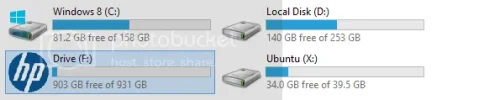
C is my Windows 8 installation, along with all the programs and some documents and stuff.
D is my Windows 7 installation, most of my programs and most of my files.
X is my Ubuntu installation, along with all the stuff I do on there.
F is my portable HDD, on which I keep backups, files I need to carry around etc.
My main drive (C) has 516 GB free of 674 GB and is the one I use with my operating system (Windows 7).
My (D) is my recovery which has 2.13 GB free of 19.7 GB. and my (E) is for HP_Tools which has 1.07 GB free of 3.95.