


So, do you want to edit your computers name? Well, this tutorial will show you how to find it, and then change the name. So, here we go!
1. Start > Control Panel > System
>> Under "Computer name", you can see your computers name
2. Now, to the right of the name, you'll see an option that says "Change Settings"; click that
3. Now, you will be brought to this window, follow the instructions
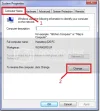
4. Now, you have this window, do as the picture says
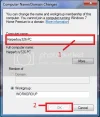
5. Click Ok than, click Close
Note: This will NOT restart the computer
That's all you have to do! It's that easy to do, and now, you can change the name when ever you want to!
1. Start > Control Panel > System
>> Under "Computer name", you can see your computers name
2. Now, to the right of the name, you'll see an option that says "Change Settings"; click that
3. Now, you will be brought to this window, follow the instructions
4. Now, you have this window, do as the picture says
5. Click Ok than, click Close
Note: This will NOT restart the computer
That's all you have to do! It's that easy to do, and now, you can change the name when ever you want to!
It takes a lot of work to write these tutorials, why not rep?


