


...so this looks a little different, doesn't it? 😉
Welcome to the brand new theme for FP 2.0! We're continuing our slow rollout of 2.0's changes starting here with the brand new theme, which feels both familiar and new at the same time. Keeps a lot of what made FP what it was, but gives it a fresh new look.
This new theme is more than just a facelift, however! This new theme comes with a brand new Theme Customizer. What's a theme Customizer, you ask? Put simply -- it allows you to make this new theme entirely your own! Don't like the grid layout? Switch it to a flat layout! Don't like either? Make it a blending of both! Want to change the accent colours? The font? The width of the layout? It's all customizable right there in the Theme Customizer! How do I access the Theme Customizer?
Simple! Click on the brand new Theme Customizer button!

This will open a new window that lets you customize EVERYTHING about the theme 🙂
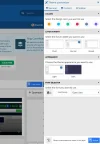
Take your time, explore, we hope you'll love the new theme as much as we do 🙂
Here is a breakdown of other features this theme is capable of:
Summary of Features
Welcome to the brand new theme for FP 2.0! We're continuing our slow rollout of 2.0's changes starting here with the brand new theme, which feels both familiar and new at the same time. Keeps a lot of what made FP what it was, but gives it a fresh new look.
This new theme is more than just a facelift, however! This new theme comes with a brand new Theme Customizer. What's a theme Customizer, you ask? Put simply -- it allows you to make this new theme entirely your own! Don't like the grid layout? Switch it to a flat layout! Don't like either? Make it a blending of both! Want to change the accent colours? The font? The width of the layout? It's all customizable right there in the Theme Customizer! How do I access the Theme Customizer?
Simple! Click on the brand new Theme Customizer button!
This will open a new window that lets you customize EVERYTHING about the theme 🙂
Take your time, explore, we hope you'll love the new theme as much as we do 🙂
Here is a breakdown of other features this theme is capable of:
Summary of Features
- User friendly
- Manageable by users
- Dark and light style
- Colour scheme palette
- Multi-page layout (Header and navigation)
- Notice block per nodes
- Responsive design
- Node layouts
- Node images
- Category images
- User group permissions
- Font selector
- Post layouts
- Post background images
- Sidebar positions
- Style property groups
- Advanced footer options
- Sticky and Normal Threads
- Button hover effect
- Navigation links hover effect
- Font awesome navigation icons
- Font-awesome visitor menu icons
- Font-awesome sidebar icons
- Font-awesome notable member page icons
- Font-awesome account page sidenav icons
- Remove Sub-navigation row
- Show/Hide Breadcrumbs
- Hide Forum Title in Index Page
- Collapsible Categories
- Sidebar Position
- Sticky Sidebar
- And more...
Last edited:


