
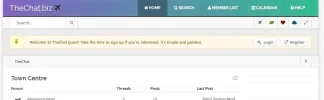
Some like it, some don't, some say it's good if the screen resolution on the monitor is adjusted.
http://thechat.biz
http://thechat.xyz
http://thechat.biz
http://thechat.xyz


Is no color at all bad?
.header {
background: #8360c3;  /* fallback for old browsers */
background: -webkit-linear-gradient(to right, #2ebf91, #8360c3);  /* Chrome 10-25, Safari 5.1-6 */
background: linear-gradient(to right, #2ebf91, #8360c3); /* W3C, IE 10+/ Edge, Firefox 16+, Chrome 26+, Opera 12+, Safari 7+ */
}

.menu .active:link, .menu .active:visited, .menu .active:hover, .menu .active:active {
background: rgba(0, 0, 0, 0.3);
}I don't think the theme is too bright. But your text is too bright and small making it hard to read.
With that said, more colours couldn't hurt. It would be enough if you just changed your header to something like this:
View attachment 5964
Some example code:
Code:.header { background: #8360c3; /* fallback for old browsers */ background: -webkit-linear-gradient(to right, #2ebf91, #8360c3); /* Chrome 10-25, Safari 5.1-6 */ background: linear-gradient(to right, #2ebf91, #8360c3); /* W3C, IE 10+/ Edge, Firefox 16+, Chrome 26+, Opera 12+, Safari 7+ */ } .menu .active:link, .menu .active:visited, .menu .active:hover, .menu .active:active { background: rgba(0, 0, 0, 0.3); }
I haven't used Mybb, but there should be a CSS-document somewhere that you can edit. You could also upload a custom CSS-document with these (and some other necessary code edits obviously) theme changes and it will override the default CSS code (if you place it after the default CSS link).Where can this code be found on the theme?
But your text is too bright and small making it hard to read.
It would be enough if you just changed your header to something like this:
The text you use for forum posts is fine, but the grey text for your forum categories and topic list is too small and bright IMO.The text has a large font, though. How is it bright? It's too black?
I used my browser's development tool to change the CSS. 😀How did you make that picture?
Since 2007, Forum Promotion has specialized in providing advertising solutions to webmasters looking to promote their communities. We pride ourselves in being the bridge that connects forum administrators, bloggers, and more.


We use essential cookies to make this site work, and optional cookies to enhance your experience.


