

You are using an out of date browser. It may not display this or other websites correctly.
You should upgrade or use an alternative browser.
You should upgrade or use an alternative browser.
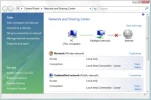
Multiple networks
- Thread starter mancala1964
- Start date

mancala1964
Reputable
death180 said:Yea upgrade to w7 or downgrade to xp
That's exactly what I was thinking.


Pvcomputers
Addicted
hmm. It must be a quick release bug. Microsoft don't test their stuff properly because they just give it to the user to test and these things go unnoticed.
mancala1964
Reputable
No, they are the same identical network connections.death180 said:If your wireless you could be picking up your neighbors networks

NBK*Twitch
Seasoned Veteran
Uhmmm what lol? Microsoft test's their programs very well before even releasing a public beta.(Now canonical or Google on the otherhand ... )Pvcomputers said:hmm. It must be a quick release bug. Microsoft don't test their stuff properly because they just give it to the user to test and these things go unnoticed.
The problem is he is picking up other signals from his neighborhood.
You need to choose your wireless and click connect and check connect automatically.
mancala1964
Reputable
NBK*Twitch said:Uhmmm what lol? Microsoft test's their programs very well before even releasing a public beta.(Now canonical or Google on the otherhand ... )Pvcomputers said:hmm. It must be a quick release bug. Microsoft don't test their stuff properly because they just give it to the user to test and these things go unnoticed.
The problem is he is picking up other signals from his neighborhood.
You need to choose your wireless and click connect and check connect automatically.
I tried that before. Didn't work. It the 'ghost' connection still showed up. After looking around on the internet, this seems to be a vista problem. Anyway when I fix it I'll post what the solution was.
NBK*Twitch
Seasoned Veteran
So your wireless is not showing up?mancala1964 said:NBK*Twitch said:Uhmmm what lol? Microsoft test's their programs very well before even releasing a public beta.(Now canonical or Google on the otherhand ... )Pvcomputers said:hmm. It must be a quick release bug. Microsoft don't test their stuff properly because they just give it to the user to test and these things go unnoticed.
The problem is he is picking up other signals from his neighborhood.
You need to choose your wireless and click connect and check connect automatically.
I tried that before. Didn't work. It the 'ghost' connection still showed up. After looking around on the internet, this seems to be a vista problem. Anyway when I fix it I'll post what the solution was.
Then have you tried resetting your modem and router?
mancala1964
Reputable
Yes, tried resetting the modem and router. There are other laptops, pc's in the house that are not having a problem at all. Just that particular laptop, so i'm pretty sure it's not a router/modem related issue.NBK*Twitch said:So your wireless is not showing up?mancala1964 said:NBK*Twitch said:Uhmmm what lol? Microsoft test's their programs very well before even releasing a public beta.(Now canonical or Google on the otherhand ... )Pvcomputers said:hmm. It must be a quick release bug. Microsoft don't test their stuff properly because they just give it to the user to test and these things go unnoticed.
The problem is he is picking up other signals from his neighborhood.
You need to choose your wireless and click connect and check connect automatically.
I tried that before. Didn't work. It the 'ghost' connection still showed up. After looking around on the internet, this seems to be a vista problem. Anyway when I fix it I'll post what the solution was.
Then have you tried resetting your modem and router?
mancala1964
Reputable
No, we are not limited as to how many connections we can have. I'm pretty sure it's the laptop/vista. No other computers are having the same problem as the laptop.The Hat Tipper said:Does your ISP have a maximum connections limit? Like I have AT&T and I can only have so many computers connected to the internet for it to work properly.
About Us
Since 2007, Forum Promotion has specialized in providing advertising solutions to webmasters looking to promote their communities. We pride ourselves in being the bridge that connects forum administrators, bloggers, and more.
Affiliates


