
[MyBB] CSS Boxes issue Mycode

Socialize

Reputable
Joined
Jun 16, 2013
Messages
161
Reaction score
0
FP$
1,519
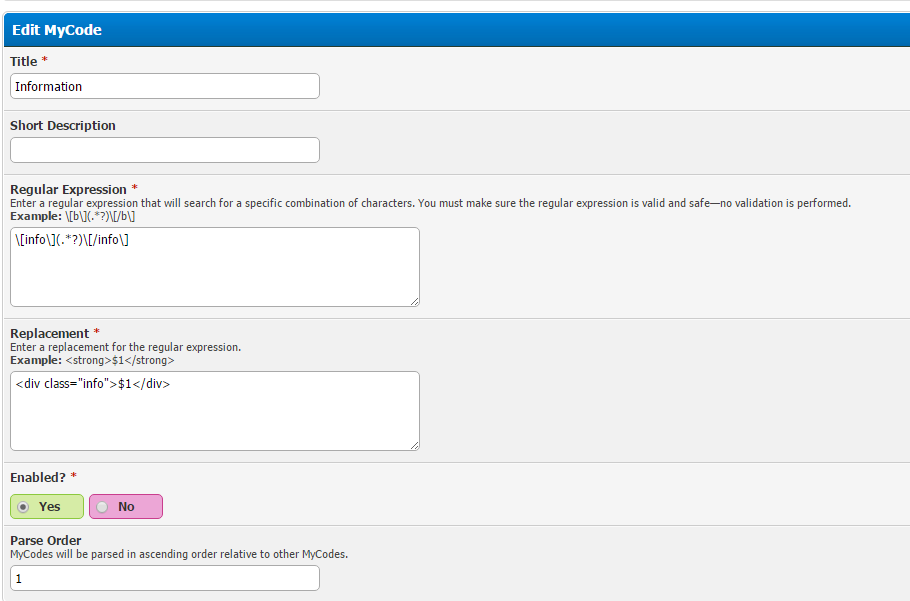
am i doing this right?
I4AJ3OZ.png


I already put this in my global.css with the theme i am using, but it's making me frustrated that it's not working.
Code:
.info, .success, .warning, .error, .mes, .tips, .chat, .cnb {
    margin: 10px 0px;
    padding: 10px 10px 15px 50px;
    background-repeat: no-repeat;
    background-position: 10px center;
    border-radius: 4px 4px 4px;
}
.info {
    background-color: #d1e4f3;
    background-image: url("http://cdn1.iconfinder.com/data/icons/musthave/24/Information.png");
    color: #00529B;
    border: 1px solid #4d8fcb;
}
.success {
    background-color: #effeb9;
    background-image: url("http://cdn3.iconfinder.com/data/icons/fatcow/32x32_0020/accept.png");
    color: #4F8A10;
    border: 1px solid #9ac601;
}
.warning {
    background-color: #ffeaa9;
    background-image: url("http://cdn3.iconfinder.com/data/icons/fatcow/32x32_0400/error.png");
    color: #9F6000;
    border: 1px solid #f9b516;
}
.error {
    background-color: #fccac3;
    background-image: url("http://cdn1.iconfinder.com/data/icons/CrystalClear/32x32/actions/messagebox_critical.png");
    color: #D8000C;
    border: 1px solid #db3f23;
}
.mes {
    background-color: #F2F2F2;
    background-image: url("http://cdn2.iconfinder.com/data/icons/fugue/bonus/icons-32/mail.png");
    border: 1px solid #AAAAAA;
    color: #545454;
}
.tips {
    background-color: #FEEAC9;
    background-image: url("http://cdn5.iconfinder.com/data/icons/woocons1/Light%20Bulb%20On.png");
    border: 1px solid #D38E49;
    color: #bb640c;
}
.chat {
    background-color: #daecfb;
    background-image: url("http://cdn2.iconfinder.com/data/icons/drf/PNG/iChat.png");
    border: 1px solid #2078c9;
    color: #066ac4;
}
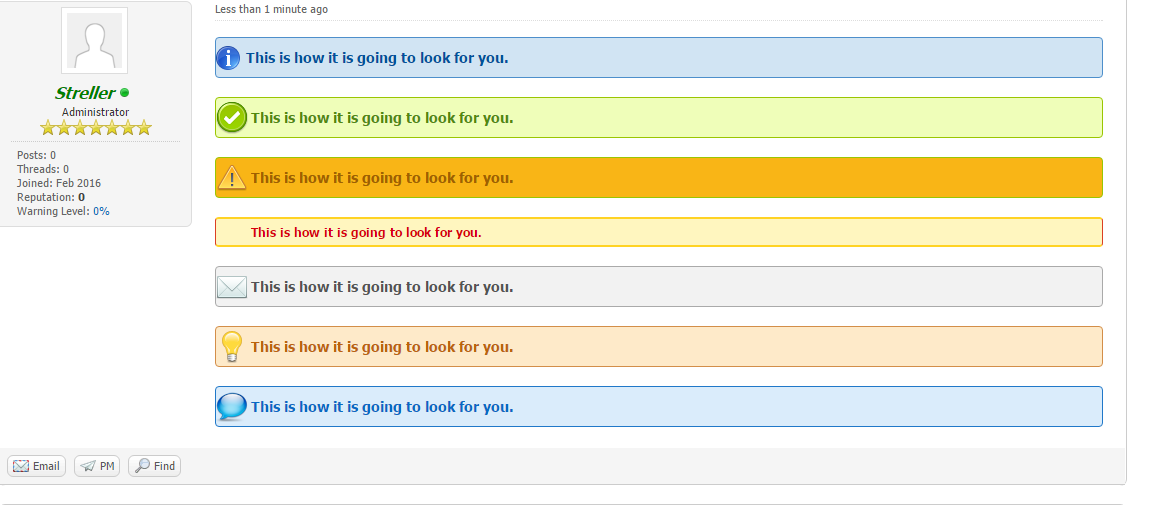
 
Alright, first of all that "background-image" will just spread that image across the entire box that you're making, so that the text will be impossible to read. So here, I've made a better version.

First thing you will need to do, is create a new stylesheet ("Add Stylesheet") should be at the top, where you would go to find "global.css". Call the new stylesheet "boxes.css".

Here's the code for it all:

Code:
.information {
background: url(http://i.imgur.com/TdSScR2.png) no-repeat left;
color: #00529B;
background-color: #d1e4f3;
padding:10px;
border: 1px solid #4d8fcb;
border-radius: 4px 4px 4px;
text-indent: 20px;
font-weight: bold;
}
.success {
background: url(http://i.imgur.com/1rOPLLi.png) no-repeat left;
color: #4F8A10;
background-color: #effeb9;
padding:10px;
border: 1px solid #9ac601;
border-radius: 4px 4px 4px;
text-indent: 25px;
font-weight: bold;
}
.warning {
background: url(http://i.imgur.com/DaT7G54.png) no-repeat left;
color: #9F6000;
background-color: #f9b516;
padding:10px;
border: 1px solid #9ac601;
border-radius: 4px 4px 4px;
text-indent: 25px;
font-weight: bold;
}
.error {
background: url(http://i.imgur.com/GHT6Z8B.png) no-repeat left;
color: #D8000C;
background-color: #fccac3;
padding:10px;
border: 1px solid #db3f23;
border-radius: 4px 4px 4px;
text-indent: 25px;
font-weight: bold;
}
.mes {
background: url(http://i.imgur.com/3zfM2zU.png) no-repeat left;
color: #545454;
background-color: #F2F2F2;
padding:10px;
border: 1px solid #AAAAAA;
border-radius: 4px 4px 4px;
text-indent: 25px;
font-weight: bold;
}
.tips {
background: url(http://i.imgur.com/MX8y5BP.png) no-repeat left;
color: #bb640c;
background-color:#FEEAC9;
padding:10px;
border: 1px solid #D38E49;
border-radius: 4px 4px 4px;
text-indent: 25px;
font-weight: bold;
}
.chat {
background: url(http://i.imgur.com/Lji2O9P.png) no-repeat left;
color: #066ac4;
background-color:#daecfb;
padding:10px;
border: 1px solid #2078c9;
border-radius: 4px 4px 4px;
text-indent: 25px;
font-weight: bold;
}

Here is an example as to how the MyCode is done:

Code:
reg expression: \[info\](.*?)\[/info\]
replacement: <div class="information">$1</div>

*Regular expression will be how it's going to be used. So like you would do [ b ] [/ b ] you would do [info][/info] .
So if you want [lol][/lol] for example, it would be \[lol\](.*?)\[/lol\] got it?

The replacement for each of them should be whatever their class starts with.

So for warning it would be <div class="warning">

PS - "Error" was being annoying, and I have a headache, so I cba to mess around with it, maybe trying to fix it will help you to learn a little about Cascading Style Sheets [CSS].

YKJV950.png
 
I was going to suggest that you remove the quotes from the URL. Nowadays, they're not needed in CSS.
 
Teg said:
I was going to suggest that you remove the quotes from the URL. Nowadays, they're not needed in CSS.

But that wasn't ever the issue.
 
Back
Top Bottom