I don't know whats going on or where they cam from but its overwhelming and taking me forever to get rid of them. When i delete 20 of them 30 more sign up!!!! help! What do i do!
Sorry also if you make an account and it gets deleted. I have made it so you must email me at [email protected] to confirm your identity.
Thanks!
You can figure that out by clicking his signature. 😛
Its phpbb3.
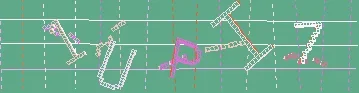
When I was using that software I had a few different methods.. Anti-Spam Question that only a human can answer plus a captcha with different random pictures as the background and email validation.
Now that Im on vb I just have the question and email validation.. Keeps the bots out 98% of the time.
The methods listed below apply primarily to phpBB 3.0.6 and above, the latest release of phpBB. Many of them will not work with older versions. Techniques for phpBB 3.0.5 and older are available here; however, they are no longer supported. Please use this topic to discuss techniques for phpBB 3.0.6 and above only.
phpBB 3.0.6 ships with many new features that make it easier than ever to prevent spam on your board. The key to prevention is making your forum unique -- the information below will help you understand the issue and provide you with solutions to eliminate spam.
FAQ
What is a spam bot?
Simply put, a spam bot (with relation to phpBB) is a script that is able to register an account and/or post spam on your board.
Is spam a security threat?
No. While spammers may seem like they are breaking through your defenses, they actually don't do anything that a regular users couldn't do (register, post, etc). Spam is therefore not a vulnerability and should not be considered as such.
How do they work?
Spam bots do what they are programmed to do; nothing more. Not having the ability to adapt on the fly puts bots at a disadvantage when put against informed administrators such as yourself. The trick for dealing with bots is to stay one step ahead of their authors. Nearly all anti-spam MODs focus on changing the registration/posting form in order to prevent bots from being able to fill out the information properly.
Do bots fill in the form the same way humans do?
No, the majority of bots submit their responses directly, without loading the form that you set up. What this means in practical terms is that changing only the HTML form will not do anything; you need to actually change how the passed information is interpreted (that means editing the .php files). If you encounter MODs that only edit HTML, they are pointless.
Should I ban bots by IP or email TLD (.ru, .info, etc.)?
If your goal is to save time, this strategy will not help. IPs are often cycled and there are thousands of available proxies that can be found just by searching. By banning IPs, you will also end up banning legitimate users. As bots use a variety of TLDs for their email accounts (including .com, .org and .net), banning international ones like .ru may help slightly, but you will once again end up banning legitimate users (and won't ban nearly every bot). In short, you should focus on preventing as many bots as possible, while not causing legitimate users too much extra hassle.
What about human spammers?
Fighting human spammers is more difficult than fighting bots. While bots will blindly attempt to register and post on every board possible, human spammers will want to make sure that their spam is actually being seen. The trick to fighting human spammers, therefore, is to remove any incentive they would have of targeting your board.
Will following this guide stop all spam?
As I said above, human spammers are difficult to stop and some bots may be adapted to work on your site. Following this guide will, however, cause a significant decrease in the amount of spam starting from the very first day 🙂
Stopping Spam - Techniques and Strategies
Custom Profile Fields - There is an article in the Knowledge Base detailing utilising Custom Profile Fields as a spam deterrent. This seems to be effective against most bots.
Admin Activation - This is not practical on most boards, but is an excellent option on smaller, less-trafficed boards. Many spam registrations utilise Gmail addresses or .cn domains, and use a seemingly random combination of letters and numbers for their username.
MODs - The best option to stop spam is to make your board somewhat unique, by using deterrents like MODs that are not implemented in a stock phpBB3 install. You may view the list of validated anti-spam MODs here. Please note that many anti-spam MODs not listed as compatible with 3.0.6 will not work with 3.0.6!
CAPTCHA Plugins - phpBB 3.0.6 introduces a new CAPTCHA plugin architecture. To enable a CAPTCHA plugin, install it if necessary, then browse to ACP -> CAPTCHA module settings. Below is a list of CAPTCHA the standard plugins, followed by validated plugins, sorted alphabetically; if yours is not included please PM myself or another Support Team member and it will be added.
Included CAPTCHA Plugins
CAPTCHA Without GD - This CAPTCHA is best known as the original phpBB2 CAPTCHA. It has long since been broken by bots, and should not be used unless no other alternatives are available.
GD 3D CAPTCHA - A 3D CAPTCHA that relies on a change in perspective as well as various other obfuscation methods to be effective. Generally effective against spambots, however some users with depth perception issues may have difficulty reading this CAPTCHA.
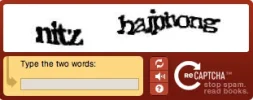
reCAPTCHA - Relies on the third-party reCAPTCHA service and requires an API key from the reCAPCHA website (available free with registration). Generally effective against spambots.
GD CAPTCHA - The changes made to this CAPTCHA in phpBB 3.0.5 made it slightly more effective against spambots. For maximum effectiveness, one should Configure this plugin to be more difficult. Do keep in mind, however, that these settings make the CAPTCHA more difficult to read, also impacting human users. Therefore, it is recommended that you tweak the CAPTCHA slightly and enable another form of spam protection to stop bots that are not stopped by the CAPTCHA. An effective CAPTCHA setup will have the CAPTCHA background X and Y axis lowered. Additionally, 3D-noise objects should be enabled and an alternate font should be selected.
Q&A CAPTCHA - Allows you to define a "Question" and a possible "Answer" in order to determine if a user is a bot. Questions should be easily recognizable and not ambiguous, and preferably not easily found using a search engine (like arithmetic). This CAPTCHA plugin is generally more suitable to niche forums. While it is possible to use a more common question ("What colour is the sky?" "What is 2+2"), there are other CAPTCHA plugins that are preferable to this if such questions are necessary.
Downloadable CAPTCHA Plugins
Crazy Maths Plugin by eviL - A CAPTCHA that shows a complex math question to the user / bot in question. The administrator can define these questions and typeset them with LaTeX-style notation.
Sortables CAPTCHA Plugin by Derky - This CAPTCHA plugin adds two columns, you can add options to each column. All the options will be displayed into one column, then the user has to sort the options from one to the other column, by dragging them with the mouse. If the options are dragged to the correct columns the CAPTCHA is solved.
Newly Registered Users Group - phpBB 3.0.6 also sees the introduction of the "Newly Registered Users" group. This feature, which may be enabled via the User Registration Settings page of the ACP, allows the administrator to define a minimum post count; if a user is below this limit they will be a member of the Newly Registered Users group. Permissions may be set on this group much like any other group -- an example use is to place the Newly Registered Users group on the moderation queue for all forums. The user is automatically removed from the group when they reach the defined post amount. Be aware that this feature is not retroactive -- users who registered prior to a board's upgrade to phpBB 3.0.5 will not be placed in the Newly Registered Users group, regardless of their post count.
These steps, used individually or together, should work to slow or stop your spam problem.
Yeah spam bots are a pain but you if you do some of the above you should stop them, also I find the easiest way is to add things like, gender, age, location fields to the registration page as they don't know what to put and they can finish the registration process
The more custom fields you have to fill out, the harder it is for spam bots to invade, as using programs like XRumer, have certain fields they have automatically fill out.
reCAPTCHA might be a good option for you. It's been cracked before, but usually it beats the default on phpBB. Also, the stopforumspam.com would also be a good option to combat some of the known spammers.