Need someone who uses "AlphaGaming" MyBB theme

jdab

Madly Diligent
Joined
Aug 29, 2010
Messages
9,642
Reaction score
1
FP$
21
I'm looking for someone who uses the MyBB forum theme called "AlphaGaming". When setting up a forum an admin messed around with the Header Templates and messed it around a little, just looking to copy the original from someone else if they have it.

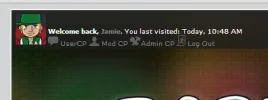
Here is what it looks like (it used to be on the left):
pt8RT.webp
The text has shifted position and size and god knows what else.

Anyone got the original?
 
Header,
Code:
<div id="container">

<div id="mainpic">
<div id="ttop">

<div id="panel">
{$welcomeblock}
</div>

<a href="index.php"><div id="tlogo">
</div>
</a></div>
</div>
		<a name="top" id="top"></a>
		<div id="header">
			
			<div class="menu">
				<ul>
                                        <li><a href="index.php">Forums</a></li>
					<li><a href="{$mybb->settings['bburl']}/search.php">Search</a></li>
					<li><a href="{$mybb->settings['bburl']}/memberlist.php">Member List</a></li>
					<li><a href="{$mybb->settings['bburl']}/calendar.php">Calendar</a></li>
					<li><a href="{$mybb->settings['bburl']}/misc.php?action=help">Help</a></li>
				</ul>

<div id="searchbar"><a name="top" id="top"></a>
<div style="float:right;">
<td class="trow1" align="center">
<form method="post" action="{$mybb->settings['bburl']}/search.php">
<input type="hidden" name="action" value="do_search" />
<input type="hidden" name="postthread" value="1" />
<input type="hidden" name="forums" value="all" />
<input type="hidden" name="showresults" value="threads" />
<input type="text" class="textbox" name="keywords" style="background:#000; width:120px; height:20px; border:1px solid #525252; color:#FFF; "  value="Search..." />
<!-- start: gobutton -->
<INPUT TYPE="image" SRC="images/alphagaming/gosearch.png" HEIGHT="14" WIDTH="16" value="Submit" >
<!-- end: gobutton -->
</form>
</td>
</div></div>
			</div>
			<hr class="hidden" />
			
		</div>
		<hr class="hidden" />
		<br class="clear" />
		<div id="content">
			{$pm_notice}
			{$bannedwarning}
			{$bbclosedwarning}
			{$unreadreports}
			{$pending_joinrequests}
			<navigation>

Do you need any of the other header templates?
 
Eternal said:
Header,
Code:
<div id="container">

<div id="mainpic">
<div id="ttop">

<div id="panel">
{$welcomeblock}
</div>

<a href="index.php"><div id="tlogo">
</div>
</a></div>
</div>
		<a name="top" id="top"></a>
		<div id="header">
			
			<div class="menu">
				<ul>
                                        <li><a href="index.php">Forums</a></li>
					<li><a href="{$mybb->settings['bburl']}/search.php">Search</a></li>
					<li><a href="{$mybb->settings['bburl']}/memberlist.php">Member List</a></li>
					<li><a href="{$mybb->settings['bburl']}/calendar.php">Calendar</a></li>
					<li><a href="{$mybb->settings['bburl']}/misc.php?action=help">Help</a></li>
				</ul>

<div id="searchbar"><a name="top" id="top"></a>
<div style="float:right;">
<td class="trow1" align="center">
<form method="post" action="{$mybb->settings['bburl']}/search.php">
<input type="hidden" name="action" value="do_search" />
<input type="hidden" name="postthread" value="1" />
<input type="hidden" name="forums" value="all" />
<input type="hidden" name="showresults" value="threads" />
<input type="text" class="textbox" name="keywords" style="background:#000; width:120px; height:20px; border:1px solid #525252; color:#FFF; "  value="Search..." />
<!-- start: gobutton -->
<INPUT TYPE="image" SRC="images/alphagaming/gosearch.png" HEIGHT="14" WIDTH="16" value="Submit" >
<!-- end: gobutton -->
</form>
</td>
</div></div>
			</div>
			<hr class="hidden" />
			
		</div>
		<hr class="hidden" />
		<br class="clear" />
		<div id="content">
			{$pm_notice}
			{$bannedwarning}
			{$bbclosedwarning}
			{$unreadreports}
			{$pending_joinrequests}
			<navigation>

Do you need any of the other header templates?
Thinking about it now, I'm not sure if that's what I need. Basically, the other Admin messed around the with the User CP | Mod CP | Admin CP | Logout, avatar and username stuff etc, just go to http://www.BarzRusTV.co.uk/forum and you'll see it looks strange. It might be welcomeblock.
 
The other admin doesn't remember which template he messed with?
 
Eternal said:
The other admin doesn't remember which template he messed with?
Well I'm guessing it was the welcomeblock template as that's all that's been effected.
That and the fact we can't make the header into a link.
 
header_welcomeblock_guest,
Code:
<script type="text/javascript">
<!--
	lang.username = "{$lang->login_username}";
	lang.password = "{$lang->login_password}";
	lang.login = "{$lang->login}";
	lang.lost_password = "<a href=\"{$mybb->settings['bburl']}/member.php?action=lostpw\">{$lang->lost_password}<\/a>";
	lang.register_url = "<a href=\"{$mybb->settings['bburl']}/member.php?action=register\">{$lang->welcome_register}<\/a>";
	lang.remember_me = "{$lang->remember_me}";
// -->
</script>
<span id="quick_login">{$lang->welcome_guest}&nbsp;&nbsp;<a href="{$mybb->settings['bburl']}/member.php?action=login">{$lang->welcome_login}</a> &mdash; <a href="{$mybb->settings['bburl']}/member.php?action=register">{$lang->welcome_register}</a></span>

header_welcomeblock_member,
Code:
<span style="float:left;"><img src="{$mybb->settings['bburl']}/{$mybb->user['avatar']}" height="45" width="50">&nbsp;</span><div id="paneltext">{$lang->welcome_back}<br/><a href="{$mybb->settings['bburl']}/usercp.php"><img src="images/alphagaming/usercp.png"></img>&nbsp;<strong>{$lang->welcome_usercp}</strong></a>{$modcplink}{$admincplink} <a href="{$mybb->settings['bburl']}/member.php?action=logout&amp;logoutkey={$mybb->user['logoutkey']}"><img src="images/alphagaming/logout.png" alt="log out"/></img>&nbsp;{$lang->welcome_logout}</a></div><br />
 
Eternal said:
<span style="float:left;"><img src="{$mybb->settings['bburl']}/{$mybb->user['avatar']}" height="45" width="50">&nbsp;</span><div id="paneltext">{$lang->welcome_back}<br/><a href="{$mybb->settings['bburl']}/usercp.php"><img src="images/alphagaming/usercp.png"></img>&nbsp;<strong>{$lang->welcome_usercp}</strong></a>{$modcplink}{$admincplink} <a href="{$mybb->settings['bburl']}/member.php?action=logout&amp;logoutkey={$mybb->user['logoutkey']}"><img src="images/alphagaming/logout.png" alt="log out"/></img>&nbsp;{$lang->welcome_logout}</a></div><br />
Thanks, you're a star. Is there a way to make the text slightly bigger?
 
You can do that by editing the CSS. Look for paneltext and tell me what the CSS is for that.
 
Back
Top Bottom