

File Name - PcGuy's Rank images
Type of work (banner, rank images, smilies or theme) - Rank Images
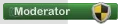
Description - Just made a couple rank images awhile ago and figured i would share them
Author Name - PcGuy
Additional Information - Due to request the PSD has been uploaded. You will notice the psd has 2 layers, one is white layer and one is color layer. To change the color layer to the color of your choice what i did was take the white layer, copy it and then go to Image> Adjustments> Hue/ Saturation> select colorize and adjust the sliders until you receive your desired color. The reason that is the easiest way to do it is because it keeps the glossy effect on the background in tact.
If you have any other questions or comments feel free to respond to this thread or PM me and i will be happy to answer!
PSD Download Link: http://www.pcprobs.org/mod.psd ( I realize that others have posted links to the file throughout the topic, you can download from whichever you like but the one posted above is the original PSD)
Preview/Demo -







Type of work (banner, rank images, smilies or theme) - Rank Images
Description - Just made a couple rank images awhile ago and figured i would share them
Author Name - PcGuy
Additional Information - Due to request the PSD has been uploaded. You will notice the psd has 2 layers, one is white layer and one is color layer. To change the color layer to the color of your choice what i did was take the white layer, copy it and then go to Image> Adjustments> Hue/ Saturation> select colorize and adjust the sliders until you receive your desired color. The reason that is the easiest way to do it is because it keeps the glossy effect on the background in tact.
If you have any other questions or comments feel free to respond to this thread or PM me and i will be happy to answer!
PSD Download Link: http://www.pcprobs.org/mod.psd ( I realize that others have posted links to the file throughout the topic, you can download from whichever you like but the one posted above is the original PSD)
Preview/Demo -


