Problem with comments on Wordpress

Harutyun

Resident
Joined
Dec 5, 2011
Messages
528
Reaction score
0
FP$
6
Hello,

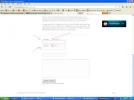
I have a strange problem. Here's a picture:
RDuVYAh.webp

As you can see there are "name" and "e-mail" boxes but it's not written, where to put the name and where to put the e-mail. Do you have any idea how to fix it? Thank you.

Harutyun.
 
Go style.css in theme editor and find:
Code:
			<label for="author">: (required)</label>
			<input type="text" name="author" id="author" value="" size="22" tabindex="1" aria-required='true' />
		</p>
	
		<p>
			<label for="email">: (required)</label>
			<input type="text" name="email" id="email" value="" size="22" tabindex="2" aria-required='true' />
		</p>
	
		<p>
			<label for="url">:</label>
			<input type="text" name="url" id="url" value="" size="22" tabindex="3" />
		</p>
			<p>
			<label for="comment">:</label>
			<textarea name="comment" id="comment" cols="100%" rows="10" tabindex="4">
		</p>

Replace it with:


Code:
			<label for="email">Your Email: (required)</label>
			<input type="text" name="email" id="email" value="" size="22" tabindex="2" aria-required='true' />
		</p>
	
		<p>
			<label for="url">Your Website:</label>
			<input type="text" name="url" id="url" value="" size="22" tabindex="3" />
		</p>
			<p>
			<label for="comment">Your Comments:</label>
			<textarea name="comment" id="comment" cols="100%" rows="10" tabindex="4"></textarea>
 
I don't have the code you posted above. Here are the paragraphs containing the word "email"

Code:
textarea,
#author, 
#email, 
#url {
font-family: 'Helvetica Neue', Helvetica, Arial, Geneva, sans-serif;
background: #FFFFFF url(images/hatch.png) repeat;
border: 1px solid #CCCCCC;
padding: 8px 10px 8px 10px;
outline: none;
color: #666666;

Code:
textarea:hover,
#author:hover, 
#email:hover, 
#url:hover {
-webkit-box-shadow:0 0 15px #C8C8C8; 
-moz-box-shadow: 0 0 15px #C8C8C8; 
box-shadow:0 0 15px #C8C8C8;

Only these 2. Which one should I change and how?

Harutyun.
 
Kevin X Dragon said:
Check your comment.php then. If it is not listed there, keep checking on all the files listed.

Found it in comments and that's how it looks:

Code:
<label for="author"><?php echo get_option_tree('name_field_text'); ?>: <?php if ($req) echo "(required)"; ?></label>
			<input type="text" name="author" id="author" value="<?php echo esc_attr($comment_author); ?>" size="22" tabindex="1" <?php if ($req) echo "aria-required='true'"; ?> />
		</p>
	
		<p>
			<label for="email"><?php echo get_option_tree('email_field_text'); ?>: <?php if ($req) echo "(required)"; ?></label>
			<input type="text" name="email" id="email" value="<?php echo esc_attr($comment_author_email); ?>" size="22" tabindex="2" <?php if ($req) echo "aria-required='true'"; ?> />
		</p>
	
		<p>
			<label for="url"><?php echo get_option_tree('website_field_text'); ?>:</label>
			<input type="text" name="url" id="url" value="<?php echo esc_attr($comment_author_url); ?>" size="22" tabindex="3" />
		</p>
	<?php endif; ?>
		<p>
			<label for="comment"><?php echo get_option_tree('comment_field_text'); ?>:</label>
			<textarea name="comment" id="comment" cols="100%" rows="10" tabindex="4"></textarea>

The code, you told me to replace it with, didn't work.

Harutyun.
 
My knowledge of .CSS and PHP is too limited to continue helping you without having the theme’s files. I recommend you download a new copy of the theme from your provider and upload it. When you upload the new files it will replace the old ones and the theme will be retune to default settings, therefore you should copy any custom coding you have added. Or you can ask go to http://press75.com/ and request help.
 
Thank you, Kevin. I will probably ask the dev of the theme how to fix it.

Harutyun.
 
Harutyun said:
Thank you, Kevin. I will probably ask the dev of the theme how to fix it.

Harutyun.

The dev of the theme refused to help me. He offered a refund instead but I like the theme, just wanna get that bug fixed. Any new ideas, guys?

Harutyun.
 
Try replacing with this code :
Code:
<label for="author">Author: <?php if ($req) echo "(required)"; ?></label>
         <input type="text" name="author" id="author" value="<?php echo esc_attr($comment_author); ?>" size="22" tabindex="1" <?php if ($req) echo "aria-required='true'"; ?> />
      </p>
   
      <p>
         <label for="email">Email: <?php if ($req) echo "(required)"; ?></label>
         <input type="text" name="email" id="email" value="<?php echo esc_attr($comment_author_email); ?>" size="22" tabindex="2" <?php if ($req) echo "aria-required='true'"; ?> />
      </p>
   
      <p>
         <label for="url">URL:</label>
         <input type="text" name="url" id="url" value="<?php echo esc_attr($comment_author_url); ?>" size="22" tabindex="3" />
      </p>
   <?php endif; ?>
      <p>
         <label for="comment">Comment:</label>
         <textarea name="comment" id="comment" cols="100%" rows="10" tabindex="4"></textarea>
 
amalfra said:
Try replacing with this code :
Code:
<label for="author">Author: <?php if ($req) echo "(required)"; ?></label>
         <input type="text" name="author" id="author" value="<?php echo esc_attr($comment_author); ?>" size="22" tabindex="1" <?php if ($req) echo "aria-required='true'"; ?> />
      </p>
   
      <p>
         <label for="email">Email: <?php if ($req) echo "(required)"; ?></label>
         <input type="text" name="email" id="email" value="<?php echo esc_attr($comment_author_email); ?>" size="22" tabindex="2" <?php if ($req) echo "aria-required='true'"; ?> />
      </p>
   
      <p>
         <label for="url">URL:</label>
         <input type="text" name="url" id="url" value="<?php echo esc_attr($comment_author_url); ?>" size="22" tabindex="3" />
      </p>
   <?php endif; ?>
      <p>
         <label for="comment">Comment:</label>
         <textarea name="comment" id="comment" cols="100%" rows="10" tabindex="4"></textarea>

Thank you for trying to help me but the code doesn't work. :/

Harutyun.
 
Harutyun said:
amalfra said:
Try replacing with this code :
Code:
<label for="author">Author: <?php if ($req) echo "(required)"; ?></label>
         <input type="text" name="author" id="author" value="<?php echo esc_attr($comment_author); ?>" size="22" tabindex="1" <?php if ($req) echo "aria-required='true'"; ?> />
      </p>
   
      <p>
         <label for="email">Email: <?php if ($req) echo "(required)"; ?></label>
         <input type="text" name="email" id="email" value="<?php echo esc_attr($comment_author_email); ?>" size="22" tabindex="2" <?php if ($req) echo "aria-required='true'"; ?> />
      </p>
   
      <p>
         <label for="url">URL:</label>
         <input type="text" name="url" id="url" value="<?php echo esc_attr($comment_author_url); ?>" size="22" tabindex="3" />
      </p>
   <?php endif; ?>
      <p>
         <label for="comment">Comment:</label>
         <textarea name="comment" id="comment" cols="100%" rows="10" tabindex="4"></textarea>

Thank you for trying to help me but the code doesn't work. :/

Harutyun.

Then you are editing the wrong file.... Look in all files inside the currrent theme folder for matching code....
 
amalfra said:
Harutyun said:
amalfra said:
Try replacing with this code :
Code:
<label for="author">Author: <?php if ($req) echo "(required)"; ?></label>
         <input type="text" name="author" id="author" value="<?php echo esc_attr($comment_author); ?>" size="22" tabindex="1" <?php if ($req) echo "aria-required='true'"; ?> />
      </p>
   
      <p>
         <label for="email">Email: <?php if ($req) echo "(required)"; ?></label>
         <input type="text" name="email" id="email" value="<?php echo esc_attr($comment_author_email); ?>" size="22" tabindex="2" <?php if ($req) echo "aria-required='true'"; ?> />
      </p>
   
      <p>
         <label for="url">URL:</label>
         <input type="text" name="url" id="url" value="<?php echo esc_attr($comment_author_url); ?>" size="22" tabindex="3" />
      </p>
   <?php endif; ?>
      <p>
         <label for="comment">Comment:</label>
         <textarea name="comment" id="comment" cols="100%" rows="10" tabindex="4"></textarea>

Thank you for trying to help me but the code doesn't work. :/

Harutyun.

Then you are editing the wrong file.... Look in all files inside the currrent theme folder for matching code....

I edit comment.php file. That should be it...

Harutyun.
 
Harutyun said:
Harutyun said:
Thank you, Kevin. I will probably ask the dev of the theme how to fix it.

Harutyun.

The dev of the theme refused to help me. He offered a refund instead but I like the theme, just wanna get that bug fixed. Any new ideas, guys?

Harutyun.

Did you try to install a new copy of the theme?
 
Kevin X Dragon said:
Harutyun said:
Harutyun said:
Thank you, Kevin. I will probably ask the dev of the theme how to fix it.

Harutyun.

The dev of the theme refused to help me. He offered a refund instead but I like the theme, just wanna get that bug fixed. Any new ideas, guys?

Harutyun.

Did you try to install a new copy of the theme?

No. I am afraid I am not that good with installing themes and might mess something up.

Harutyun.
 
Back
Top Bottom