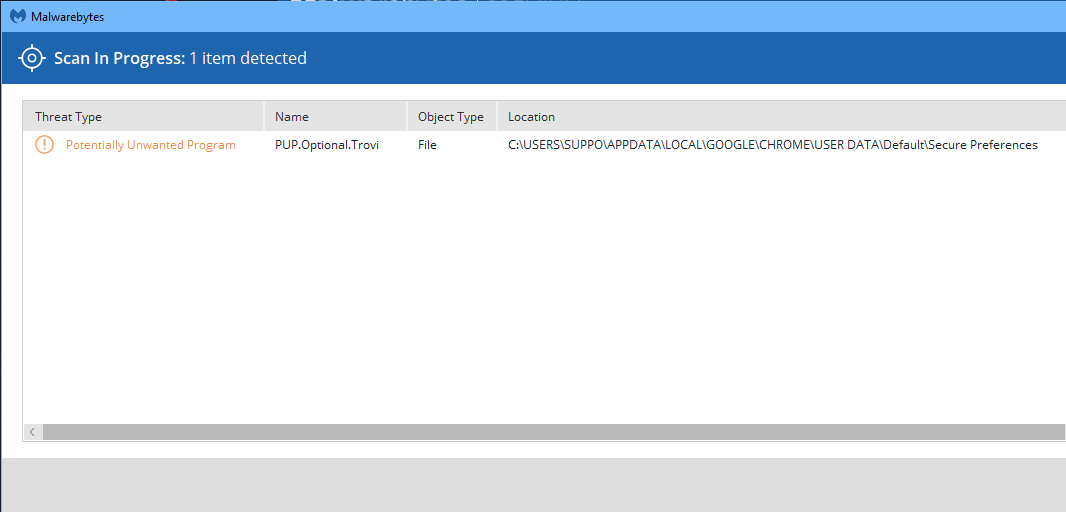
PUP.Optional.Trovi is the detection for a family of search hijackers targeting the most popular browsers. Download
https://www.malwarebytes.com/adware/ to remove it or if your skilled, remove it by regedit.exe
I'll look into it.
How did you get it in the first place. That's the question to find out
Not sure to be honest. Multiple people use this computer. First time I have come in contact with this type that I am unable to easily remove.
Malwarebytes
www.malwarebytes.com
-Log Details-
Scan Date: 12/20/18
Scan Time: 9:24 AM
Log File: 003ef56a-0463-11e9-8db3-2c4d5452af91.json
-Software Information-
Version: 3.6.1.2711
Components Version: 1.0.508
Update Package Version: 1.0.8407
License: Premium
-System Information-
OS: Windows 10 (Build 17134.472)
CPU: x64
File System: NTFS
User: *******
-Scan Summary-
Scan Type: Threat Scan
Scan Initiated By: Manual
Result: Completed
Objects Scanned: 414003
Threats Detected: 1
Threats Quarantined: 1
Time Elapsed: 2 min, 47 sec
-Scan Options-
Memory: Enabled
Startup: Enabled
Filesystem: Enabled
Archives: Enabled
Rootkits: Enabled
Heuristics: Enabled
PUP: Detect
PUM: Detect
-Scan Details-
Process: 0
(No malicious items detected)
Module: 0
(No malicious items detected)
Registry Key: 0
(No malicious items detected)
Registry Value: 0
(No malicious items detected)
Registry Data: 0
(No malicious items detected)
Data Stream: 0
(No malicious items detected)
Folder: 0
(No malicious items detected)
File: 1
PUP.Optional.Trovi, C:\USERS\SUPPO\APPDATA\LOCAL\GOOGLE\CHROME\USER DATA\Default\Secure Preferences, Replaced, [401], [454808],1.0.8407
Physical Sector: 0
(No malicious items detected)
WMI: 0
(No malicious items detected)
(end)