

Hi how can u get these switches to show inline?.
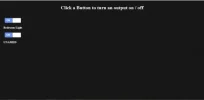
HTML:
CSS:
HTML:
Code:
<!DOCTYPE html>


<html lang="en">


<head>

<link rel="stylesheet" type="text/css" href="style.css">

	<meta http-equiv="content-type" content="text/html; charset=utf-8">

	<title>Control Panel</title>


</head>


<body>

<div id="headermargin"><h1>Click a Button to turn an output on / off</h1></div>

<!--This is The Button for Bedroom Light-->
<div class="bedroomlightonoffswitch">
    <input type="checkbox" name="bedroomlightonoffswitch" class="bedroomlightonoffswitch-checkbox" id="bedroomlightonoffswitch" checked>
    <label class="bedroomlightonoffswitch-label" for="bedroomlightonoffswitch">
        <div class="bedroomlightonoffswitch-inner"></div>
        <div class="bedroomlightonoffswitch-switch"></div>
    </label>
</div>
<div id="bedroomlightbuttontag"><p><b>Bedroom Light</b></P></div>

<!--This is UNAMED BUTTON-->
<div class="UNAMEDonoffswitch">
    <input type="checkbox" name="UNAMEDonoffswitch" class="UNAMEDonoffswitch-checkbox" id="UNAMEDonoffswitch" checked>
    <label class="UNAMEDonoffswitch-label" for="UNAMEDonoffswitch">
        <div class="UNAMEDonoffswitch-inner"></div>
        <div class="UNAMEDonoffswitch-switch"></div>
    </label>
</div>
<div id="UNAMEDbuttontag"><p><b>UNAMED</b></P></div>

<!--This is The Script for bedroom light-->
<script>
var light = document.getElementById("bedroomlightonoffswitch"),
    ajaxer = function(val){
       var r = new XMLHttpRequest();
        // this assumes this page is http://host
        // so that http://host/?on and http://host/?off work
        r.open("GET", "http://192.168.1.67/?b"+val, true);
        r.onreadystatechange = function () {
           if (r.readyState != 4 || r.status != 200) return;
               alert("Success Switching Bedroom Light!");
               // if you care about what's on the page that's
               // loaded you can access it at r.responseText
           };
        r.send(null);
    }

light.onchange = function(){
    if (this.checked){
       ajaxer("on");
    }else{
       ajaxer("off");
    }
}
</script>
<!--This is the script for UNAMED-->
<script>
var light = document.getElementById("UNAMEDonoffswitch"),
    ajaxer = function(val){
       var r = new XMLHttpRequest();
        // this assumes this page is http://host
        // so that http://host/?on and http://host/?off work
        r.open("GET", "http://192.168.1.67/?b"+val, true);
        r.onreadystatechange = function () {
           if (r.readyState != 4 || r.status != 200) return;
               alert("Success Switching UNAMEDonoffswitch!");
               // if you care about what's on the page that's
               // loaded you can access it at r.responseText
           };
        r.send(null);
    }

light.onchange = function(){
    if (this.checked){
       ajaxer("on");
    }else{
       ajaxer("off");
    }
}
</script>

</body>


</html>
CSS:
Code:
body
{
background-image:url('background.png');
background-repeat:repeat;
}

p {color:white;}
h1 {color:white;}

#headermargin {
margin-top:30px;
margin-bottom:50px;
text-align: center;
}

#bedroomlightbuttontag {
margin-left:15px;
font-size:20px;
}

#UNAMEDbuttontag {
margin-left:15px;
font-size:20px;
}


.bedroomlightonoffswitch {
    margin-left:23px;
    position: relative; width: 110px;
    -webkit-user-select:none; -moz-user-select:none; -ms-user-select: none;
}
.bedroomlightonoffswitch-checkbox {
    display: none;
}
.bedroomlightonoffswitch-label {
    display: block; overflow: hidden; cursor: pointer;
    border: 2px solid #666666; border-radius: 5px;
}
.bedroomlightonoffswitch-inner {
    width: 200%; margin-left: -100%;
    -moz-transition: margin 0.3s ease-in 0s; -webkit-transition: margin 0.3s ease-in 0s;
    -o-transition: margin 0.3s ease-in 0s; transition: margin 0.3s ease-in 0s;
}
.bedroomlightonoffswitch-inner:before, .bedroomlightonoffswitch-inner:after {
    float: left; width: 50%; height: 30px; padding: 0; line-height: 30px;
    font-size: 16px; color: white; font-family: Trebuchet, Arial, sans-serif; font-weight: bold;
    -moz-box-sizing: border-box; -webkit-box-sizing: border-box; box-sizing: border-box;
}
.bedroomlightonoffswitch-inner:before {
    content: "ON";
    padding-left: 10px;
    background-color: #6194FD; color: #FFFFFF;
}
.bedroomlightonoffswitch-inner:after {
    content: "OFF";
    padding-right: 10px;
    background-color: #F8F8F8; color: #666666;
    text-align: right;
}
.bedroomlightonoffswitch-switch {
    width: 55px; margin: 0px;
    background: #FFFFFF;
    border: 2px solid #666666; border-radius: 5px;
    position: absolute; top: 0; bottom: 0; right: 51px;
    -moz-transition: all 0.3s ease-in 0s; -webkit-transition: all 0.3s ease-in 0s;
    -o-transition: all 0.3s ease-in 0s; transition: all 0.3s ease-in 0s;
    background-image: -moz-linear-gradient(center top, rgba(0,0,0,0.1) 0%, rgba(0,0,0,0) 100%);
    background-image: -webkit-linear-gradient(center top, rgba(0,0,0,0.1) 0%, rgba(0,0,0,0) 100%);
    background-image: -o-linear-gradient(center top, rgba(0,0,0,0.1) 0%, rgba(0,0,0,0) 100%);
    background-image: linear-gradient(center top, rgba(0,0,0,0.1) 0%, rgba(0,0,0,0) 100%);
}
.bedroomlightonoffswitch-checkbox:checked + .bedroomlightonoffswitch-label .bedroomlightonoffswitch-inner {
    margin-left: 0;
}
.bedroomlightonoffswitch-checkbox:checked + .bedroomlightonoffswitch-label .bedroomlightonoffswitch-switch {
    right: 0px;
}


.UNAMEDonoffswitch {
    margin-left:23px;
    position: relative; width: 110px;
    -webkit-user-select:none; -moz-user-select:none; -ms-user-select: none;
}
.UNAMEDonoffswitch-checkbox {
    display: none;
}
.UNAMEDonoffswitch-label {
    display: block; overflow: hidden; cursor: pointer;
    border: 2px solid #666666; border-radius: 5px;
}
.UNAMEDonoffswitch-inner {
    width: 200%; margin-left: -100%;
    -moz-transition: margin 0.3s ease-in 0s; -webkit-transition: margin 0.3s ease-in 0s;
    -o-transition: margin 0.3s ease-in 0s; transition: margin 0.3s ease-in 0s;
}
.UNAMEDonoffswitch-inner:before, .UNAMEDonoffswitch-inner:after {
    float: left; width: 50%; height: 30px; padding: 0; line-height: 30px;
    font-size: 16px; color: white; font-family: Trebuchet, Arial, sans-serif; font-weight: bold;
    -moz-box-sizing: border-box; -webkit-box-sizing: border-box; box-sizing: border-box;
}
.UNAMEDonoffswitch-inner:before {
    content: "ON";
    padding-left: 10px;
    background-color: #6194FD; color: #FFFFFF;
}
.UNAMEDonoffswitch-inner:after {
    content: "OFF";
    padding-right: 10px;
    background-color: #F8F8F8; color: #666666;
    text-align: right;
}
.UNAMEDonoffswitch-switch {
    width: 55px; margin: 0px;
    background: #FFFFFF;
    border: 2px solid #666666; border-radius: 5px;
    position: absolute; top: 0; bottom: 0; right: 51px;
    -moz-transition: all 0.3s ease-in 0s; -webkit-transition: all 0.3s ease-in 0s;
    -o-transition: all 0.3s ease-in 0s; transition: all 0.3s ease-in 0s;
    background-image: -moz-linear-gradient(center top, rgba(0,0,0,0.1) 0%, rgba(0,0,0,0) 100%);
    background-image: -webkit-linear-gradient(center top, rgba(0,0,0,0.1) 0%, rgba(0,0,0,0) 100%);
    background-image: -o-linear-gradient(center top, rgba(0,0,0,0.1) 0%, rgba(0,0,0,0) 100%);
    background-image: linear-gradient(center top, rgba(0,0,0,0.1) 0%, rgba(0,0,0,0) 100%);
}
.UNAMEDonoffswitch-checkbox:checked + .UNAMEDonoffswitch-label .UNAMEDonoffswitch-inner {
    margin-left: 0;
}
.UNAMEDonoffswitch-checkbox:checked + .UNAMEDonoffswitch-label .UNAMEDonoffswitch-switch {
    right: 0px;
}


