Strong password generator

gamestoenjoy

Addicted
Joined
Jan 30, 2010
Messages
928
Reaction score
98
FP$
2,481
Hi,

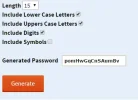
I have created a strong password generator that generates a secure random password using JS.
You can decide on the length of the passwords and from which characters types to compose it.

Please give me your feedback about it.
Do you find it useful?

Link: Strong password genertor
 
Very cool!

This is useful, and I will use it. There is also other features on your website that I will use. 🙂
 
Pretty neat. I tried to get some incorrect results by hitting generate over and over and eventually got one:


I glanced over your source, and noticed it never checked if all the "include" checkboxes actually "included" the desired result.


Just wondering why you got all your conversions in one file?
 

Attachments

  • pw.webp
    pw.webp
    9.7 KB · Views: 132
Thanks, I will fix the bug found by you.

Sim said:
Just wondering why you got all your conversions in one file?

For me it is convenient that all the conversions are located in one JS file (I only need to minify it).

Do you think about a different way to store the conversions?
 
It will be hard to remember such random passwords where you prefer to login manually, such as your emails and Facebook accounts. Password generator can work good for automated softwares where you stay login throughout.
 
Perhaps you should make each password contain an uncommon word, so they will be easier to remember.
 
RH-Calvin said:
It will be hard to remember such random passwords where you prefer to login manually, such as your emails and Facebook accounts. Password generator can work good for automated softwares where you stay login throughout.

You can use a 8 characters random password which is quite easy to remember for most people (of course you can keep the password in hidden place in case you forgot it).
 
RH-Calvin said:
It will be hard to remember such random passwords where you prefer to login manually, such as your emails and Facebook accounts. Password generator can work good for automated softwares where you stay login throughout.
I actually use something called KeePass to keep all of my passwords encrypted and strong. They're 256-bit passwords that I don't have to remember. All I need to do is double click on the field for "Forum Promotion" and it will copy the password to my clipboard for 10 seconds. Then I can lock them all up with a master key and store the encrypted file in my dropbox somewhere for all my devices to use. 🙂

It's pretty nifty, if you ask me!
 
Alo said:
Perhaps you should make each password contain an uncommon word, so they will be easier to remember.

I like the sound of this idea. I've used sites like this before, and the way they come up with letter/number combos, it's enough to make you wonder sometimes. Almost as bad as using the forgot my password link on forums. Just now I used that link on a support forum where I forgot my password, and the stuff the email came up with was ridiculous! I actually had to write it down somewhere.
 
@Twisted Fairytale Indeed cool method!

You can use the password genarator to generate random passwords, and store them using the KeePass.
 
DudeThatsErin said:
I use LastPass to generate passwords and save them. I love it! Use premium cause I love it so much!

Good tool but the password generator is also useful in many cases.
 
Sim said:
Pretty neat. I tried to get some incorrect results by hitting generate over and over and eventually got one:
I glanced over your source, and noticed it never checked if all the "include" checkboxes actually "included" the desired result.

Thanks, I fixed it 🙂
 
This is a very good tool, well done for taking the time and effort to make it. It is very useful to have because it is very important to have a secure password! The only trouble is remembering it haha 🙂
 
MrGravyCakes said:
This is a very good tool, well done for taking the time and effort to make it. It is very useful to have because it is very important to have a secure password! The only trouble is remembering it haha 🙂

Thanks 🙂

I store all my strong passwords in an encrypted file in my Dropbox account.
 
Back
Top Bottom