

tutorials4all
Reputable
Before getting started download this font and have them installed first.
SF TransRobotics
Create a new file of any size, i used 420x250 pixels. Fill it up with black background, write “Transformers” with SF TransRobotics font downloaded just now and centralized it.
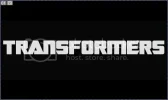
Now right click on the text layer in layer pellet and click Rasterize Layer.
Next select the bottom of the letter "T" with Rectangle Marquee tool and then click Ctrl+C to copy it.

Now click Ctrl+V and put it below the letter "T" to increase the length. Do this with the letter "F" also.

Your image should look something like this.
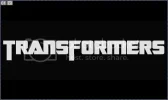
Now merge all the layers except the black background one, for this hide the black background layer and pres Ctrl+Shift+E
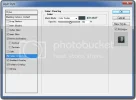
Now go to Blending Mode of the "Transformers" layer (Right click on the layer in layer pellet and select Blending Options) and use the following settings.
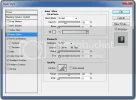
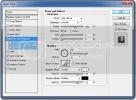
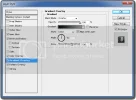
[Color Stop 1: #000000, Location: 0%
Color Stop 2: #90999d, Location: 100% ]
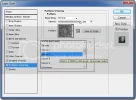
You final image will be like this.

Tip: SF TransRobotics font’s "<" and ">" draws the logo for Autobots and Decepticons. You can use it for real effects.

SF TransRobotics
Create a new file of any size, i used 420x250 pixels. Fill it up with black background, write “Transformers” with SF TransRobotics font downloaded just now and centralized it.
Now right click on the text layer in layer pellet and click Rasterize Layer.
Next select the bottom of the letter "T" with Rectangle Marquee tool and then click Ctrl+C to copy it.
Now click Ctrl+V and put it below the letter "T" to increase the length. Do this with the letter "F" also.
Your image should look something like this.
Now merge all the layers except the black background one, for this hide the black background layer and pres Ctrl+Shift+E
Now go to Blending Mode of the "Transformers" layer (Right click on the layer in layer pellet and select Blending Options) and use the following settings.
[Color Stop 1: #000000, Location: 0%
Color Stop 2: #90999d, Location: 100% ]
You final image will be like this.
Tip: SF TransRobotics font’s "<" and ">" draws the logo for Autobots and Decepticons. You can use it for real effects.
Help us to bring more tutorials for you by joining our tutorial forum where you can find more great tutorials. Click Tutorials4All!


