vbulletin 4 ISSUE

rsnf

Reputable
Joined
Jul 22, 2012
Messages
176
Reaction score
0
FP$
6
I have an issue where mods are not working as well as I am unable to get avatars to appear larger.


I have installed a few vbulletin mods "xml files simple template mods" However they are not working. They install perfectly fine but they are simply not working. One mod I installed is a top posters on the week/month where it is suppose to add a link in the quick links drop down on the nav bar it simply is not adding that drop down link. Another issue I am having is I installed a mod where it is suppose to display a number next to the new posts in the navbar that too simply is not working.

I have also tried to adjust the size of avatars to increase their size and after adjusting the size and saving in the admin control panel the avatars still appear to small. The website is http://www.sportszonedaily.com for anyone who can take a look at it and see if they have a solution to these isuues. I can also create a test account if need be and give it the appropriate privileges to access the admin c panel if need be.

I truly appreciate any and all help that people are willing to give.

 
as a fellow vb4 user i'll do my best to help, but first im going to need some information namely, i'll register an account on the forums as well just to see it from a regular users perspective 🙂

- What Version of VB4 are you running?
- Links to each of the mods you tried to install
- Link to your website


From there we can try and walk through it all and see if i cant help you out 🙂
 
No worries about late replies :L


For the first mod (the Top Posters one) which think is the one you said you had problems getting the link to show under the "Quick Links" dropdown,
to solve this what you wanna do is go ahead and open up your ACP ("Admin Control Panel") and look to the left side list and look for
"Settings"

8d0ad62a9a628ccbca0ee2058b24ec71.webp

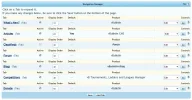
Open up that tab and look for "Navigation Manager" and it should look like this screen (Or similar as i have a different ACP theme)

2b33c8e8abec7374154dcebf66ad8e19.webp

You see where it says forums? Go ahead and click on that, and it should give you a more detailed view of what links are in that section,
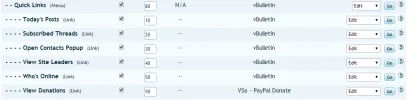
scroll down untill you see the heading "Quick Links", follow the line its on untill you see the edit dropdown on the right and set that to
"Add new link"

cd3f71163ad134881230248528052105.webp

When it loads up set it to the following
Code:
Title: Top Posters*
Target URL: http://sportszonedaily.com/misc.php?do=vsatpomy
Active: Yes
Display Order: 100*
Show Permission Name: LEAVE THIS BLANK!!!!!!!!

* Change this to what ever you want

I'll look into the other mod now but could you tell me your avatar problem or have you resolved that? did you set it through the usergroup manager?
 
Hello I followed your steps and that did not work even though it shows in the quick links navigation as being there...............Both instances.


I was able to figure out the avatar issues as I found that I had to have the members uninstall the avatar they had already uploaded before I made the size adjustments and just re upload it and they are fine now.
 
rsnf said:
Hello I followed your steps and that did not work even though it shows in the quick links navigation as being there...............Both instances.

Much like i said on your chatbox (which one is it btw??) the best step here would be to contact the creator of the custom theme and see if they can shed any light on the situation it might just be the way the theme itself was actually coded


rsnf said:
I was able to figure out the avatar issues as I found that I had to have the members uninstall the avatar they had already uploaded before I made the size adjustments and just re upload it and they are fine now.

Glad you got this fixed, though for future reference im sure theres a setting for rebuilding user avatars which is what you should use after changing the default values
 
The chat box is Vsa-Chatbox (AJAX) by Valter http://www.vbulletin.org/forum/showthread.php?t=235271 I use pretty much all his mods as they are very good in my opinion. Unfortunately the person I had paid over a year ago to custom design my theme is no longer on the net it appears. Obviously it is an issue I am having with the theme being coded for an earlier version of vbulletin which now is causing conflict with the latest version of vbulletin 4. Honestly not sure what to do here as I want to continue to use the thme because it in my opinion till this day is by far the best looking theme I have ever seen as far as vb 4 themes go. Guess I will have to do some research into getting the theme updated.
 
You may need to uninstall it and try installing it again. Be sure to click "yes" when installing to allow overwrite. Not sure, if this will help or not. I have it on my forum and I had to uninstall it and then reinstall and it works fine now. Good luck.
 
flirtsnfriends said:
You may need to uninstall it and try installing it again. Be sure to click "yes" when installing to allow overwrite. Not sure, if this will help or not. I have it on my forum and I had to uninstall it and then reinstall and it works fine now. Good luck.

I appreciate your help I have already uninstalled and reinstalled the mods to see if that might have been the issue but had no luck. I think it id definitely the fact that my custom theme I paid to have designed is not updated to the current version of vbulletin. I just do not know what it would cost or whatever to get my theme updated to vb4 latest version.
 
Have you asked for help at vbulletin.org ? I had this happened years ago and it was a headache to fix. You have to update the templates and it's hard to do if you didn't create the style. I had a horrible time because I had my style custom made and the guy who did mine....well, he disappeared..lol Good luck hun.
rsnf said:
flirtsnfriends said:
You may need to uninstall it and try installing it again. Be sure to click "yes" when installing to allow overwrite. Not sure, if this will help or not. I have it on my forum and I had to uninstall it and then reinstall and it works fine now. Good luck.

I appreciate your help I have already uninstalled and reinstalled the mods to see if that might have been the issue but had no luck. I think it id definitely the fact that my custom theme I paid to have designed is not updated to the current version of vbulletin. I just do not know what it would cost or whatever to get my theme updated to vb4 latest version.
 
Funny you mention your custom designer vanished because mine did as well. Well it's really not that funny but you know what I mean lol. Yes I have asked for help on vb.org but as I am sure you are well aware it takes forever most times to get assistance especially if it is not listed in the paid request section lol.
 
Sad that he disappeared because he was very good. M?
rsnf said:
Funny you mention your custom designer vanished because mine did as well. Well it's really not that funny but you know what I mean lol. Yes I have asked for help on vb.org but as I am sure you are well aware it takes forever most times to get assistance especially if it is not listed in the paid request section lol.
 
flirtsnfriends said:
Sad that he disappeared because he was very good. M?
rsnf said:
Funny you mention your custom designer vanished because mine did as well. Well it's really not that funny but you know what I mean lol. Yes I have asked for help on vb.org but as I am sure you are well aware it takes forever most times to get assistance especially if it is not listed in the paid request section lol.


You have a very nice website btw may have to join here soon lol

-- 12 Feb 2014, 11:05 --

Still having the Navbar issues if anyone might have a solution?<br /><br />-- 12 Feb 2014, 15:08 --<br /><br />Issue Fixed!!!
 
Back
Top Bottom