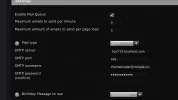
Hello! So, I just realized that my account verification set via. Email, is not being received, or sent... I was going through my settings, on both SMF, and bluehost, but I realy just couldn't figure it out. I was wondering if anyone would be willing to take the chance to help ><
Have you recently changed hosts, or transferred your domain to a new register? Also - make sure you have the email set so they come from the correct address.
Can I ask, does it work if you disable the mail queue?
Because SMF documentation says that if that option is not enabled, the SMF mail system will work the same way that previous versions did, and will just send the mail straight away.
Shouldn't the SMTP port be 25, not 26? Otherwise it'd probably be blocked by whatever your firewall is.
465 is a port for SMTP using SSL... Though if you don't have SSL then you may want to try port 587 instead.
Though are you on VPS or shared host?
If you're on VPS check your firewall (iptables?) and make sure that port 25 is not blocked. If you don't see anything for it then add a rule to accept for it.
If you're on shared hosting then try 587 and 25 and see if they work.