

You are using an out of date browser. It may not display this or other websites correctly.
You should upgrade or use an alternative browser.
You should upgrade or use an alternative browser.
Using FileZilla
- Thread starter 1ruleyou
- Start date


Here are the instructions for installing phpbb3:
http://www.phpbb.com/support/documentat ... lation.php
Here are the instructions for installing a phpbb3 style:
http://www.phpbb.com/support/documentat ... les_manage
http://www.phpbb.com/support/documentat ... lation.php
Here are the instructions for installing a phpbb3 style:
http://www.phpbb.com/support/documentat ... les_manage
Thank you for all of your feedback! It worked out.
I installed phpBB3 but now it wont direct to my webpage. It has an error. How do I make it go to my home page. My filezilla page has the following files in it..
/
+phpBB3
stats
I know there needs to be an index.html or something somewhere.
I installed phpBB3 but now it wont direct to my webpage. It has an error. How do I make it go to my home page. My filezilla page has the following files in it..
/
+phpBB3
stats
I know there needs to be an index.html or something somewhere.
1ruleyou said:Thank you for all of your feedback! It worked out.
I installed phpBB3 but now it wont direct to my webpage. It has an error. How do I make it go to my home page. My filezilla page has the following files in it..
/
+phpBB3
stats
I know there needs to be an index.html or something somewhere.
There is no index.html in phpBB. It is index.php.
1ruleyou said:Okay where do I put it? where does it need to be?
I am lost. The file should be at like www.site.com/index.php. So that would be in the public_html area.
Why not post a screenshot of where you uploaded this to?
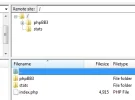
1ruleyou said:That folder doesn't exist\
Send me a PM with your FTP details. I will write up a tutorial of what I did for you.
About Us
Since 2007, Forum Promotion has specialized in providing advertising solutions to webmasters looking to promote their communities. We pride ourselves in being the bridge that connects forum administrators, bloggers, and more.
Affiliates


